


Mohd Arbaaz is an Editor and Writer at Fitnessison.com with 5 years of experience in SEO and digital content creation. He creates informative, reader-focused content covering fitness, workouts, nutrition, health, healthy lifestyle, technology, and computers.

Shashi Teja is a Reviewer at Fitnessison with over 6 years of experience in SEO, content strategy, digital publishing, and content optimization. He reviews content for clarity, research quality, topical relevance, readability, structure, and overall usefulness to readers.
Last Updated: October 1, 2026
Fitness trackers & wearables. They are nothing like the basic pedometers. Using a variety of devices, they could now track training, heart rate, sleep patterns, how far you‘ve traveled, your pace, recovery trends and other exciting health or activity indicators. The sector has grown more complex as well. You may opt for a compact fitness band, a complete smartwatch, a GPS sports watch, a smart finger ring or an entirely screenless tracker. Two products may boast the same health capabilities while they differ significantly in battery duration, level of comfort, connectivity to your phone and available training options.
The point isn‘t finding the wearable that records the most measurements. The point is finding one that measures the things you care about, is comfortable enough to wear all the time, and gives you information you can really use.
A quick definition: A fitness wearable can be any electronic device worn on the body and which employs sensors and software to measure or log activity, exercise and some health related metrics. I include here the basics while providing links to more advanced guides where necessary.
What Are Fitness Trackers and Wearables?
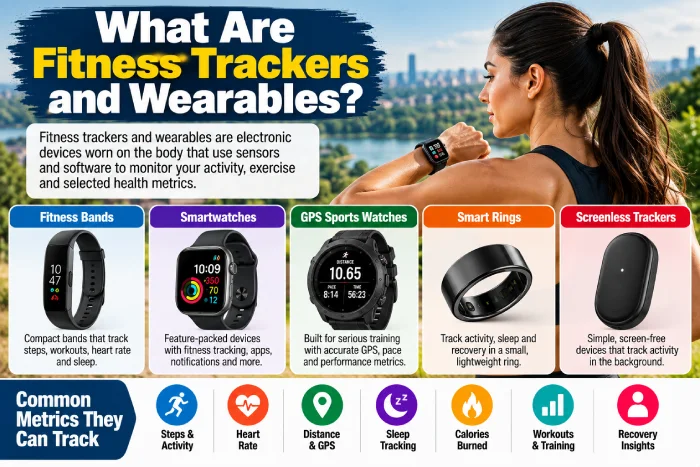
They are devices intended specifically to record data about a person‘s activity, exercise and other wellness habits. The contemporary category incorporates a variety of different designs.
Fitness Bands
Fitness bands are generally slim wrist-mounted gadgets. The often record steps, exercise, pulse and sleep, while having longer run times than many feature-crowded smartwatchs. Their more modest displays might also be easier.
Smartwatches
Smartwatches offer a combination of fitness activity tracking with broader features that connect to the phone.
Depending on the model, you may get:
- Apps
- Notifications
- Calls
- Music controls
- Payments
- GPS
- Workout tracking
- Health-related sensors
This can be the size, the price and the more often you have to charge.
GPS Sports Watches
Sports watches focus more on training. They are very helpful for running, cycling, hiking and outdoor activities involving GPS, pace, distance, workout plan and long-lasting battery.
Smart Rings
Smart rings gather data from your finger without protruding display on your wrist. They may be appealing to those mainly seeking passive tracking, sleep and recovery patterns. They are not necessarily better than wrist wearables. They just address a different issue.
Screenless Fitness Trackers
Another category is to do away with the display altogether. The wearable just takes the data in the background and sends it to a phone application. This could appeal to someone who wants activity/sleep/ recovery tracking but without another screen to focus on.
Something to remember: decide on a physical form factor before having to look through dozens of individual specs.
Practical tip: Sometimes you wonder if you want to touch the thing while exercising or if you really just want to look up something later. That one question is a quick way to cut the category.
Mini summary: bands are on service not to make it complicated, smartwatches are on service to make it connected, sports watches is on service to train, rings and screenless devices are on service to quiet and passive tracking.
Learn more about: Visit our Fitness Tracker Buying Guide that provides a comprehensive pre-purchase checklist.
What Can Fitness Trackers and Wearables Measure?
Most wearables did not even measure everything that shown in their app. Sensors merely collect signals. Software then converts those signals into measurements or estimates (which in many times lead to confuse).
Steps and Movement
Accelerometers measure movement. Software analyzes the actual movement patterns to derive the number of steps and amount of activity. As an estimate of total movement, this is reliable enough to make step count a relevant indicator of total activity but the number should not be relied upon as though it were accurate. Activities with abnormal arm movement, pushing objects, slow walking and repeats of non-walking movements can alter readings.
Heart Rate
Optical sensors are common for wrist devices. By shining light into the body the monitor can detect changes the body makes when blood floods through, which it uses to estimate HR. Useful for normal workout monitoring, and HR trends for resting during normal everyday activity. Movement and where the device is positioned can have an effect on this.
Distance and Pace
Outdoor distance can be calculated using satellite positioning if the wearable device is equipped with GPS or another supported satellite-navigation sensor. Devices not equipped with a stand-alone GPS can use a linked phone or estimate distance based on steps and stride data.
Calories Burned
This number should be approached with care. Most wearables make an estimate of calories used based on measures of activity, heart rate and profile data (like age, weight etc.) it is simply an estimate of what your body is doing, not a direct measure.
Sleep
Wearables might inter-est physiologic as well as movementdata to identify when you fell asleep, when you awoke, and when you moved through each sleep cycle. Sleep monitoring can be informative of trends over time. It should not be interpreted as a sleep study.
Recovery and Readiness
Many wearables, which aggregate various metrics into proprietary recovery, stress or readiness scores. Examples of inputs they might include are sleep, recent activity, resting HR and HRV. Since all brands score these differently, a “75” on one cannot be directly compared to a “75” elsewhere.
Fundamental point: Wearables integrate both signals from direct sensor measurement and these same signals transformed by an algorithm.
Tip: When monitoring, observe the trends over several days or weeks as opposed to being triggered by each individual number.
Mini summary: Steps and HR can be lost in day to day living much more readily than calories, sleep stages and the composite scores.
Explore next: Read our full guide to the Accuracy of Fitness Trackers.
Fitness Band vs Smartwatch: Which Makes More Sense?
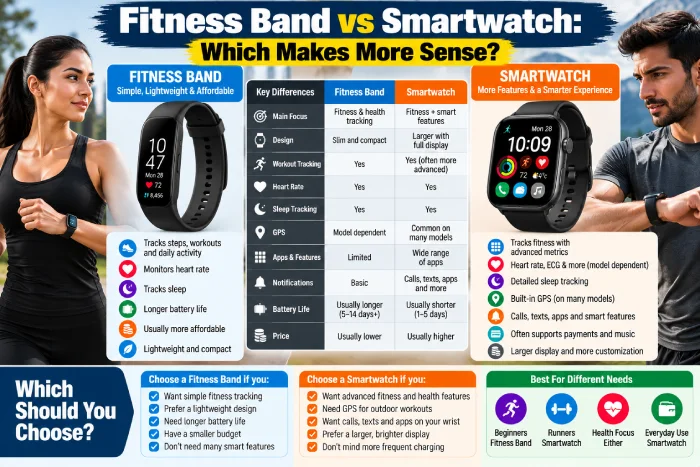
This is one of the most popular purchasing decisions. Both the and categories are capable of monitoring general activity, although their focuses are distinct.
| Feature | Fitness Band | Smartwatch |
| Activity tracking | Yes | Yes |
| Heart-rate tracking | Common | Common |
| Sleep tracking | Common | Common |
| GPS | Model dependent | Unavailable on many models |
| Display | Smaller | Larger |
| Apps | Limited | More extensive |
| Phone notifications | Basic to moderate. The knowledge needed to restore the associated balance is moderate. Using a searching score of 41 and weight 606 (I would suspect a very mild search overall), Level 2 was indicated. | Extensive |
| Battery | Often longer | Often shorter |
| Size | Usually smaller | Usually larger |
| Price | Often lower | Often higher |
When only interested in related, a fitness band is logical. When you want your wearable to also function like an extension of your phone, a smartwatch seems like a logical choice. However, a lot of crossover exists. Even some more advanced fitness trackers have incorporated features traditionally identified with smartwatches, and vice versa.
Think About Distraction Too
More features is not a benefit per se. If your life is crowded by looking at notifications then adding another glowing screen to your wrist might not be an improvement. Perhaps a more simplistic band or ring and a little less screen is the answer. Alternatively a runner as an example who wants to see the pace during the run might want to see the watch face.
Main point of the above: Select based on what you want to do on the device, not what you want it to record.
Practical example: An individual only concerned with number of steps walked per day, sleep monitoring and intensity levels might be happy with a band. Another individual concerned with GPS running stats, controlling music and phone notifications might be better suited with a sports or smart watch.
Mini summary: Fitness bands tend to focus on simplicity and battery life; smart watches aim to deliver a more integrated experience.
Next explore: Read a full comparison of Smartwatches and Fitness Bands.
How Useful Is Heart-Rate Tracking?
One of the best metrics obtainable on modern wearables is heart rate.
It can provide context for:
- Workout intensity
- Baseline heart rate trends
- Exercise sessions
- Recovery patterns
- Training zones
However, wrist based heart rate is not perfect. Optical sensors require good skin contact and measurement can be thrown off by rapid movement.
Fit Matters
A sliding on the wristwatch might have difficulty maintaining good contact with the sensors. Follow the manufacturer‘s instructions on positioning and keep the sensor area relatively clean. During exercise, the device may need to be more firmly secured than during everyday use.
Don’t Chase Every Beat
In the event of the scale producing an anomalous reading, use a high quality relatively fresh sample and think about the circumstances.
- Jebea or Jebet: Is it and was it loose?
- Did the workout seem to be heavier in terms of movement?
- Was the sensor dirty?
- A second consideration concerned consistency whether the device recorded accurately over the twoRecording time periods.
Look for will events read as one important change or the can they not?
Main point learned: wrist heart-rate monitors can be used for daily training, but the results depend on device, fit and activity.
Practical tip: Athletes who want extremely accurate HR information during specific sessions might also look into specialized HR sensors.
Mini summary: Make use of consumer wearable provides heart rate practical training details but be aware measurement boundaries of consumer sensors.
Next up: Discover more in our guide to Heart Rate Monitor Accuracy.
How Useful Is Sleep Tracking?
Monitoring your sleep can lead to a conscious choice to go to bed at a consistent time, and pay more attention to sleep patterns. It‘s not going to matter so much what your wearable reports as far as one 1 hour 47 minute period of one particular sleep stage. It‘s the pattern.
For example:
- Is your bedtime always so late?
- Sleep time potentially decreasing?
- Is your schedule very different on the weekends?
- Do the above habits cause a better or worse night?
Those trends are far more practical than just obsessively following a nightly score.
Sleep Stages Have Limits
Utilizing sensors to determine sleep rather than recording brain activity in the traditional way of a full clinical sleep study, the consumer wearable is limited in determining sleep stages. Sleep stage information provided should be used with caution. The device can guide self-awareness, it cannot replace a comprehensive assessment for a suspected sleeping disorder.
Key takeaway:Sleep trackers excel as long-term pattern tools.
Tip: After looking at your wearable info, check in with yourself and ask: How do I actually feel? A good score isn‘t necessarily a reflection of how recovered you feel. A bad score isn‘t necessarily a prediction of how the rest of your day will turn out.
Mini summary: pay attention to bedtime, wake time, the averages and trends over time before you worry about your time in each sleep stage.
Explore next: Read How Accurate Are Sleep Trackers?
Do You Need GPS in a Fitness Tracker?
GPS is a good tool when distance, pace and routes are measured outside.
Think:
- Running
- Cycling
- Hiking
- Outdoor walking
- Trail activities
A wearable with GPS inside can track all outdoor activities without the need to carry your phone to provide location data.3 wearables can also track using connected GPS, which means they are using your phone to supply location data4
Built-In vs Connected GPS
GPS built-in is practical if you don‘t want to have your phone during exercise. Connected GPS could be quite satisfactory if you take your phone on every walk or run. GPS may raise battery drain, especially during long outdoor activities.
Important to take away from it:do not ever fall for the expensive GPS thinking it sounds better.
Practical example: Someone walking in the neighborhood with a phone may not need free GPS on their device; however, a marathon runne, who requires pace and route data (without carrying a phone) most likely would.
Mini summary: GPS should only be utilized for specific goals.
Next we explore: Next, go to our overview of GPS Fitness Trackers.
Which Fit and Comfort Checks Matter?
A wearable only gathers useful continuous data if it‘s actually worn. Comfort should be as much of a concern as the sensors.
Consider:
- Device weight
- Band material
- Wrist size
- Case dimensions
- Ring sizing
- Button placement
- Overnight comfort
- Sweat/water exposure.
A big sports watch feels great outside while training but not great on the bed. A smart ring may feel great on the hands during sleeping but not great during big barbell training. No one size-fits-all formfactor.
Consider Your Entire Day
Imagine wearing the device:
- At work.
- During exercise.
- In the shower, if able.
- While sleeping.
- In the course of everyday household work.
If you anticipate doing it over and over again, think about whether the spaces could mess up the data you are interested in.
Important to remember: Wearability is a performance factor.
Practical tip: When it comes to rings, be sure to follow the sizing instructions rather than just getting a regular size.
Mini summary: The best sensor package is not much use if the device on your desk most of the day.
Next to see explore: Check out our Fit and Sizing Guide to discover more about our Fitness Trackers.
How much battery life do you need?
The main cell specs require perspective.
A device might advertise several days of battery life, but actual use can change depending on:
- GPS
- Display settings
- Always-on display
- Workout tracking
- Notifications
- Sensor settings
- Cellular connectivity
- Battery age
Consider this from the perspective of charging needs, not just to chase the largest number. If you want overnight sleep tracking, then a watch that needs to be frequently charged overnight may be more trouble than it‘s worth. If you do long outdoor events, GPS battery life wins over regular (sapphire and above) smartwatch battery life.
Create a Charging Routine
A device is more practical if the charging conveniently, such as while showering, at a desk or in the bathroom before work.
The key takeaway is that real-world battery life is more significant than the headline maximum.
Mini summary: If you plan to wear the device at a certain time of day, set the charging cycle during that time, and keep it charged until you are ready to wear it.
Next up, also check out: Read our guide to battery life of fitness trackers.
Does Phone Compatibility Matter?
Absolutely.
Test compatibility before purchase. Some wearables operate across all popular mobile platforms. Others are best experienced within one specific ecosystem.
Compatibility can affect:
- Setup
- Notifications
- Calls
- Payments
- Music
- Health-data syncing
- App integrations
- Software features
The “means” Bluetooth actually “means” every feature works the same with each phone!
Check the Companion App
The hardware is just one-half of the experience. A wearable might capture awesome data but display it within a UI you find distasteful.
Before buying, investigate:
- App layout
- Required account
- Data export
- Third-party integrations
- Subscription features
- Phone requirements
Main point: You are buying hardware plus an ecosystem.
Headed paper tip: Utilise the current compatibility list on the manufacturers web site for your exact phone and operating-system version.
Mini summary: A less expensive tracker that fits nicely with your current apps may be more appropriate than a more versatile machine that doesn‘t.
Explore Further: View our Guide to Compatibility of Fitness Trackers with Phones.
How Accurate Are Fitness Trackers?
How much more precise? This is a question that cannot be answered with such a simple response as:.
Accuracy depends on:
- Measurement
- Device
- Sensor
- Activity
- Fit
- Body movement
- Environment
- Algorithm
Counting steps on a normal walk is a very different problem from estimating calorie expenditure while strength training. Heart rate while standing still is different from heart rate during a fast, irregular walk. GPS on an open road is very different from GPS in between buildings.
Treat Calories Carefully
The calorie amount can appear accurate because the app can show you a definite number. That accuracy isn‘t real. Your device is trying to estimate energy expenditure based on current activity level, not by measuring your body‘s actual mechanics. Let it serve as a guide nothing more when it comes to what you eat.
Trends Can Be More Useful Than Isolated Numbers
If your regular resting heart rate reading fluctuates within a tight range for a few weeks, a trend may provide more information than an isolated comparison to one person‘s device. Repeated measurements can make up for inaccurate ones.
Main point: fitness trackers are a consumer measurement device and not a perfect measurement instrument.
Practical tip: Prioritize the question “Does this measure capture change effectively?” over “Is this measurement accurate?”
Mini summary: reliability is task-dependent. The step and heartrate technology have improved, the estimated energy expenditure is still difficult.
Next explore: Our Fitness Tracker Accuracy cluster analyses the evidence metric one at a time.
How Do Privacy Settings Affect Wearable Use?
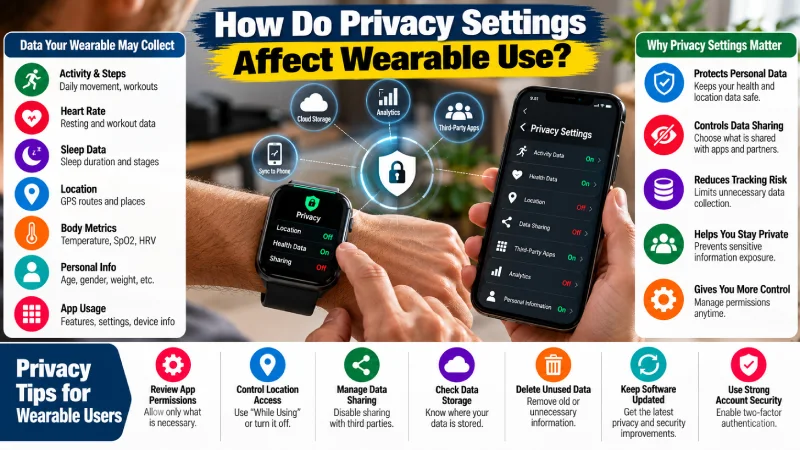
The collection of highly personal data by fitness wearables.
Depending on your device and settings, that may include:
- Activity
- Location
- Heart rate
- Sleep
- Workout history
- Account information
- Health-related data
Do not assume that all information about fitness is protected under the same laws as information in your medical record.
Review Permissions
See what the app asks for when setting up.
Ask whether it genuinely needs:
- Continuous location
- Contacts
- Microphone
- Notifications
- Background activity
- Additional health apps that can be accessed
Certain permissions are required for certain functionalities. Others are not.
Review Sharing Settings
Social features can be appealing, but use caution when automatically sending routes or location data. A running route that always begins and ends in the same place can disclose more than you realize.
Protect the Account
Use a secure, distinct password, and activate stronger account-security features where possible. Keep the software up-to-date (app and wearable firmware).
Important takeaway: Privacy needs to be a buying factor, not something to think about after spending time configuring.
Practical advice: read the manufacturer‘s up-to-date privacy notice and see what data can be erased or exported.
Mini summary: Wearable convenience, there‘s always a data trade-off. You have to consciously decide how much you want to give and get.
Read more about: Find out everything you need to know about Wearable Data Privacy.
Common Fitness Tracker Buying Mistakes
Buying the Most Advanced Device
Having more sensors does not mean the data will be more informative. Select the appropriate sensors for your purpose.
Ignoring Comfort
A wearable cannot sleep stats from the nightstand.
Choosing for Calorie Numbers Alone
Calorie expenditure is one of the more difficult wearable estimates.
Forgetting Subscription Costs
Certain gadgets or services lock complex information into recurring subscriptions. Look at the total cost of ownership.
Ignoring Phone Compatibility
Don‘t think that features that are available on the listed sites are all supported on mobiles.
Focusing Only on Battery Maximums
Actual battery life varies greatly based on your usage.
Treating Every Measurement as Medical Information
Healthcare- related general wellness features are not a healthcare- related general wellness function.
Myth vs Fact
Myth: A more costly fitness tracker will always give more accurate results.
Fact: Cost will allow improved construction, GPS, displays, software and sensors, but accuracy is device or measured metric dependant.
Myth: the amount of calories lets you know exactly on what you burned.
Fact: estimated based on sensor data and algorithms.
Myth: Fitness tracking requires a Smartwatch.
Fact: different bands, rings, sports wristwatches and screenless trackers can be used for covering different needs.
Myth: There is a misconception that increasing the amount of health data will directly lead to better fitness.
Fact: Data is not useful unless you do something with it.
Troubleshooting Inconsistent Fitness Tracker Data
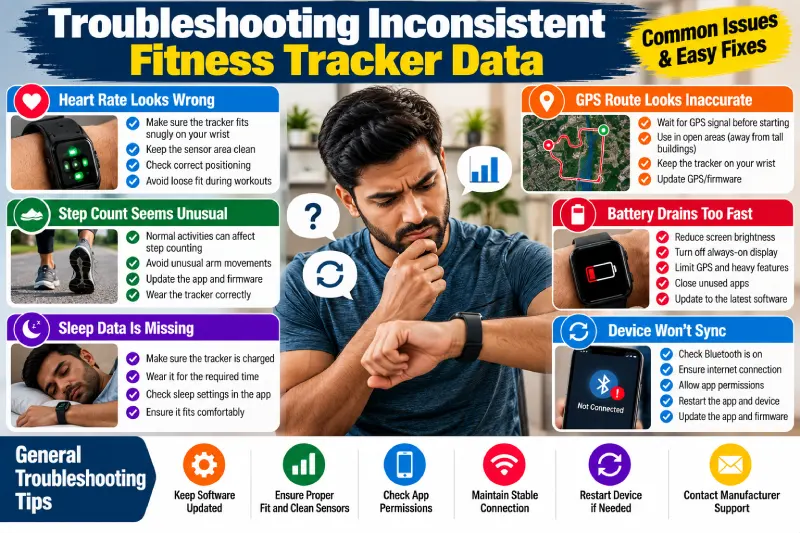
Before you take your wearable back thinking that it is faulty go over the basics.
Heart Rate Looks Wrong
Check fit and sensor contact. Clean sensor following the manufacturer‘s guidelines and verify that the equipment has been positioned appropriately.
Step Count Seems Unusual
Day‘s activities thinking. Deviations of movement can be related to step detection.
GPS Route Looks Wrong
Before starting the device (if appropriate), allow time for it to get a fix. Keep in mind that buildings, the terrain and the environment can interfere with signals from the satellites.
Sleep Is Missing
Check battery level, fit, sleep settings, worn for the required duration.
Device Will Not Sync
Check Bluetooth, internet connection, permissions of the app, update the software or check if there‘s a need to restart the app or the device according to the manufacturer. If problems persist, refer to the manufacturer‘s support section.
Step-by-Step: How to Choose a Fitness Wearable
Step 1: Pick One Main Goal
Examples:
- Move more
- Track running
- Understand the sleep patterns of the elderly.
- Workout heart rate monitor
- Track outdoor routes
- Follow other recovery trends.
Step 2: Choose Your Form Factor
Choose a band, a smartwatch, a sports watch, a ring or a screenless tracker according to your lifestyle.
Step 3: Identify Essential Sensors
When you do think you need independent GPS? Highly trained training data? sensors sitting around for the night? separate the must-have from the nice to have.
Step 4: Check Comfort and Fit
Think of both the exercise and sleep.
Step 5: Check Phone Compatibility
Determine your precise phone and OS.
Step 6: Compare Battery Under Your Usage
Both the (single condition) user of a GPS-enabled device and the (always-on-display) user should look further than advertised maximum figures.
Step 7: Check the App and Subscription
Discover what is still accessible without subscribing for every month.
Step 8: Review Privacy Controls
Identify what information is being gathered. Explore how sharing can be regulated.
Step 9: Read Independent Accuracy Testing
Watch out for tests that test the measurement you care about.
Step 10: Buy for Consistency
On the whole, the best piece of wearable will be the one which integrates well into your personal environment and one that helps you to get information that you will actually make use of.
Future of Fitness Trackers and Wearables
Wearables are becoming more passive. Screenless bands and rings show that a fitness device doesn‘t have to compete for your eyes all day. And at the same time, software is gaining in importance. Instead of showing raw metrics, wearable platforms are more and more trying to interpret many metrics into recovery, readiness, coaching or wellness insights.
This makes the other answer to the question necessary as well: the ability for a user to understand the difference between measuring and interpreting. A sensor might receive a signal. An algorithm would then convert that signal into a measurement. Finally, a second algorithm might derive from multiple measurements a score. The more an interpretation a number goes through, the more it becomes necessary to understand what exactly the number is intended to convey to you, and what it is not meant to convey.
Final Buying Checklist
Before purchasing, confirm:
- The device follows your primary goal.
- The form factor is comfortable.
- It is with your mobile phone.
- Battery lasts with your delivery.
- GPS satisfy the needs of my application.
- The app has an approximate amount of useful information.
- Most key features are not feature-locked behind a subscription.
- The device is well seated.
- You understand the following largest errors of accuracy.
- The privacy / sharing settings are according to your expectations.
- Replacement bands or chargers are generally obtainable.
- The warranty is appropriate to the purchase.
A wearable should not turn your every day into a continuous, but instead should clarify what fitness is so that the definition isn‘t confusing. stream of numbers. Use the data to notice patterns, guide sensible decisions and stay consistent with the habits that matter.
FAQs
What is the difference between a fitness tracker and wearable?
Wearable technology is the larger class. Fitness trackers are a subset of wearables that focus on activity, exercise and other health/wellness related data.
What can a fitness tracker measure?
Some devices can also measure the number of steps you take, the intensity of a workout, your heart rate, how far you run, your pace, your location from GPS routes, your sleep, your body temperature over time, and many other things.
Are fitness trackers accurate?
Accuracy varies by measurement, device, activity and fit. Work well for: Daily step count and Heart rate, Work less well for: Calorie expenditure, Further detail on sleep interpretation, have greater limitations.
Is a smartwatch better than a fitness band?
Not by default. Watches can have more apps and connected functionalities, but fitness bands tend to be “more simple” in terms of size and battery life.
Are smart rings good for fitness tracking?
Useful for passive health, sleep and recovery tracking. Those in need of in-depth, realtime workout info may prefer a watch which offers a display.
Do I need GPS on my fitness tracker?
Built-in GPS might be needed if you want outdoor route, pace and distance recording without having to take your phone along. Otherwise connected GPS will do.
Can a fitness tracker diagnose health problems?
Consumer wellness measurements need not automatically be regarded as a diagnosis. Certain regulated functions may have a different status so it is best to check the specific device and feature.
How tight should a fitness tracker be?
It should keep its contact with the sensor, as described by the manufacturer, without feeling strangulated. Adhere to device placement protocols.
Should I wear my tracker while sleeping?
Only if it interests you and the device is suited and comfortable to wear overnight.
How often should I replace a fitness tracker?
No set replacement schedule. Replace or upgrade when battery life, damage, changing compatibility, or missing features significantly impact your needs.
Final Conclusion
The top topical-authority strategy here would be to maintain this page as the primary decision hub, rather than an aggregation of individual-buyers guide pages such as ‘best tracker’. As competitors have already published site-wide localized reviews of ‘best tracker’ type content, your opportunity exists to become the authority for all the remaining measure, device, heartbeat, rest, GPS, fitness, battery, compatibility, and privacy questions.
The evidence also provides E-E-A-T support for the pillar: clarity that wearable accuracy has improved but is still metric-dependent, the importance of sleep-tracking use for trends not diagnoses, and acknowledgment that the general US consumer needs to understand the higher level of protection for health data based on HIPAA.